

Let’s do it! TANE Penguins part 2: Key to Improving Resolution

In the previous article, we looked at Effective Resolution and Noise‑Free Resolution. Because AD converters naturally generate noise, the actual usable resolution is often lower than the nominal resolution listed on the datasheet. Understanding these concepts is essential for estimating the usable resolution in your application. In this article, we focus on one of the key techniques for improving resolution: oversampling.
How to Think About AD Converter Resolution
Before heading to the main topic, it’s important to first review how to think about the resolution of an AD converter.
When I first began supporting customers, I simply assumed that the resolution printed on the datasheet represented the device’s accuracy.
But as I later learned, AD converters generate noise, and this noise can reduce the actual usable resolution. That’s where the concepts of Effective Resolution and Noise‑Free Resolution become essential.
Effective Resolution is defined using the AD converter’s RMS noise and its full‑scale input voltage range, as shown below:

Noise‑Free Resolution is defined using the peak‑to‑peak noise and the same full‑scale input range:

(For more detail, see the previous article: <Let’s do it! TANE Penguins Part 1: How Should We Think About ADC Resolution?>)
There is also a concept called ENOB (Effective Number of Bits), which is often confused with Effective Resolution but is actually different.
Effective Resolution and Noise‑Free Resolution are based on DC noise performance, while ENOB considers AC noise performance.
ENOB is typically calculated using FFT analysis of a sine‑wave input and is defined in IEEE Standard 1057 as:

To understand ENOB correctly, you also need to understand SINAD (Signal‑to‑Noise and Distortion Ratio), defined as:

And ENOB can also be expressed using SINAD:

After learning about Effective Resolution and ENOB, I started reading datasheets more carefully.
But when I actually ran the numbers, I found that the resolution of some AD converters was lower than I expected, which often made device selection difficult.
That’s when a senior FAE gave me a helpful advice:
“Use the oversampling, you can improve the resolution.”
Until then, I didn’t even know there was a technique for increasing resolution.
In this article, I’ll explain what I learned about oversampling, a practical method for improving resolution.
Understanding the Nyquist Theorem
Oversampling is one method for improving the resolution of an AD converter, but before discussing how it works, it’s important to understand the Nyquist theorem.
According to the Nyquist theorem, an AD converter must sample at a frequency at least twice the highest frequency component of the input signal.
If the sampling frequency is lower than this requirement, information in the original signal will be lost.
The frequency equal to half the sampling rate, fs/2, is called the Nyquist frequency.
If the sampling frequency does not satisfy this “twice the maximum input frequency” condition, a phenomenon called aliasing will occur, which introduces errors.
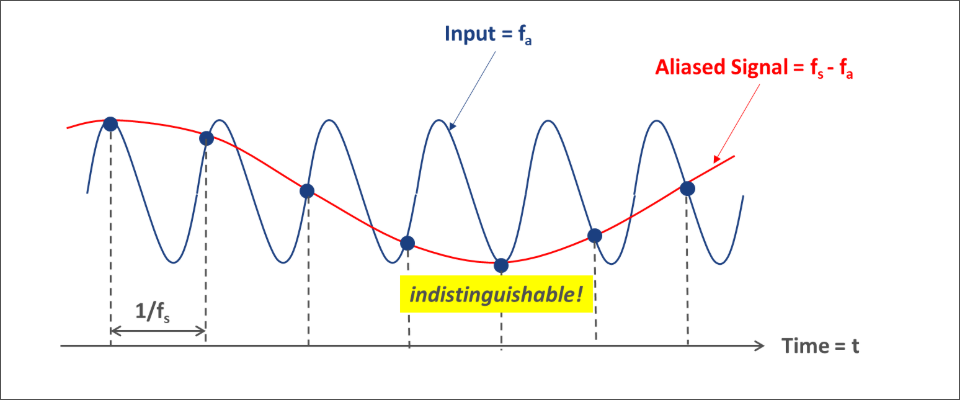
For example, when sampling a sine wave with frequency fa, if the sampling frequency fs is slightly higher than fa but still less than 2fa (fa < fs < 2fa), aliasing occurs.
In this case, the sampled data contains both the original frequency fa and a false low‑frequency component fs − fa.
As shown in Figure 1, the sampled data cannot distinguish whether the original signal frequency was fa or fs − fa.
Because of this, when determining the sampling frequency of an AD converter, it is essential to use a sampling rate that satisfies at least twice the Nyquist frequency.
Oversampling
Oversampling is one method for improving the resolution of an AD converter.
As described, oversampling means sampling at a frequency much higher than half of the Nyquist frequency (fs/2).
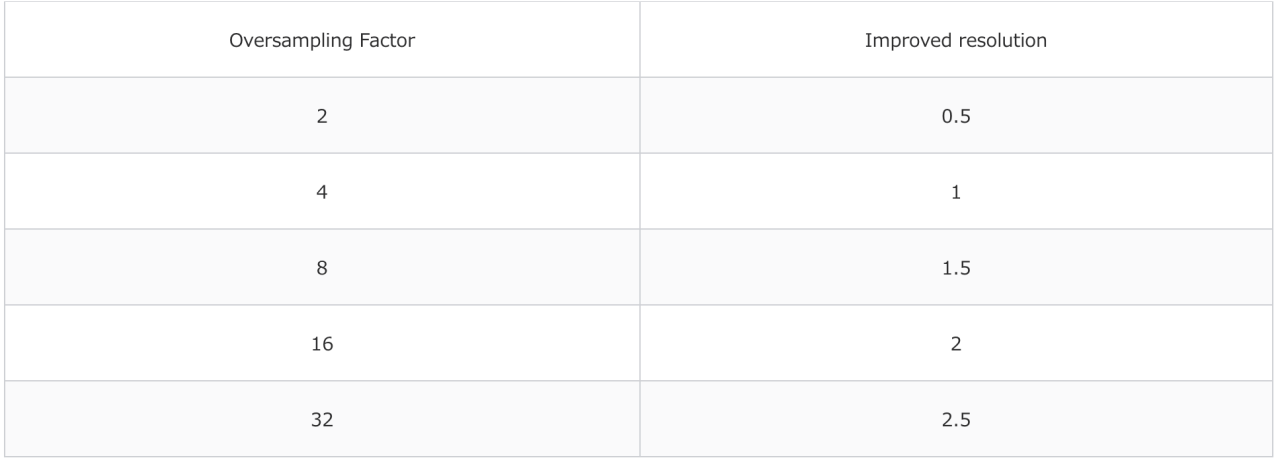
A general rule of thumb is that oversampling by a factor of four improves the resolution by one bit.
For example, consider an AD converter with N‑bit resolution and no oversampling.
If you sample a 100 Hz single‑tone input signal at twice the Nyquist frequency (2 × 100 Hz = 200 Hz), you can obtain the converter’s inherent ENOB.
If you oversample with k = 4, the sampling frequency becomes 800 Hz.
When you oversample, the quantization noise spreads over a wider bandwidth. After that, a digital filter removes the unwanted high‑frequency components, which improves the signal‑to‑noise ratio (SNR).
The improvement in SNR can be estimated using the AD converter’s resolution N and the following equation:

Here,
k = fs / (2 × fin)
fin is the input signal frequency.
Using this relationship, you can determine the oversampling factor needed to increase resolution.
Since SNR can also be expressed as: SNR(dB) = 6.02 ×N + 1.76
Let’s consider the case where you want to increase the resolution of a 16‑bit AD converter by one bit.
A 17‑bit converter would have:

Next, we use the earlier formula to calculate the required oversampling factor:

Thus, to gain an additional bit of resolution, you need to oversample by at least a factor of four.
The table below shows how resolution improves for different oversampling ratios.
Conclusion
When evaluating the resolution of an AD converter, it’s important to estimate how many bits of resolution you can actually use in your application.
And when you think about resolution, the sampling rate is one of the key settings you can’t overlook.
Oversampling is one effective technique for increasing resolution, and it can be a powerful part of the signal‑processing chain when you need more accurate conversion results from an AD converter.
By choosing an appropriate oversampling ratio, you can gain additional resolution and achieve more stable, higher‑quality output data.
Related Reading
Let’s do it! TANE Penguins Part 1: How Should We Think About ADC Resolution?
For more information:

Links
Copyright 2026 Macnica Cytech Limited


